Transparent clock and weather
MACHAPP Software LtdWeather
4.236.09K Reviews
- Version
- 9.20.2
- Installs
- 50.00M
- Age Rating
- Everyone
Screenshots
Our Review of Transparent clock and weather
 Analysis by Appyee
When I’m deciding whether to carry an umbrella or leave earlier because of rain, I want the answer somewhere I’ll actually notice it. Transparent clock and weather puts time and weather information together, with a home-screen look that can blend into a wallpaper rather than dominate it. That combination is the app’s main appeal: it makes a quick glance useful without asking me to open a separate forecast screen every time.
It is a free weather app from MACHAPP Software Ltd, and its long-running presence is reflected in a 4.2 average from around 986,000 ratings and over 50 million installs. The current version is 9.01.2, it is rated for Everyone, and it supports Android 6.0 and later. Optional in-app purchases range from $4.99 to $15.99 per item, so I’d start with the free experience and decide whether any paid extras matter to my routine before spending.
A useful baseline: glance first, open the app when needed
My practical way to use it is to treat the clock and weather display as a prompt, not as a reason to study every forecast detail. A glance can answer whether the temperature has shifted or whether rain is worth checking more closely. If I’m planning a longer outing, I can then open the app and look beyond the immediate snapshot. That split keeps the home screen convenient while reserving a fuller check for decisions that need more context.
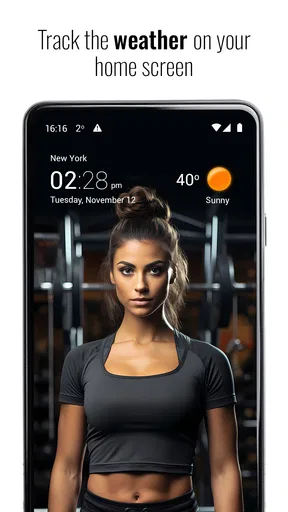
The transparent appearance is more than decoration when a widget is visible all day. It can sit over a wallpaper without feeling like a solid block, although the result depends on the background: delicate text may be harder to read over a busy image. I’d choose a simple wallpaper or adjust the widget’s appearance until the clock and weather remain legible. A beautiful setup that I can’t read at a glance defeats the purpose.
First Impressions
Upon downloading Transparent clock and weather, I was immediately struck by its clean and modern interface. The app’s design feels intuitive, with a user-friendly layout that makes navigation a breeze. The transparency feature is a neat touch, allowing your wallpaper to shine through while still keeping all the essential information right at your fingertips. It feels like the app is seamlessly integrated with your home screen rather than just another widget taking up space.
Features Galore
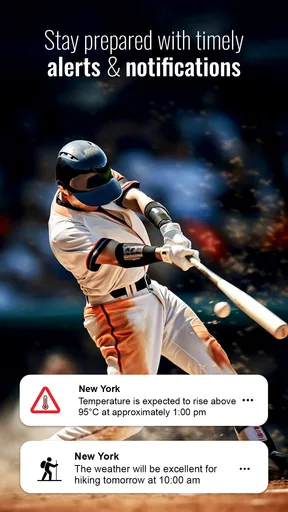
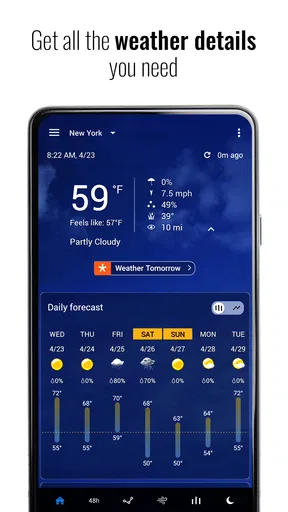
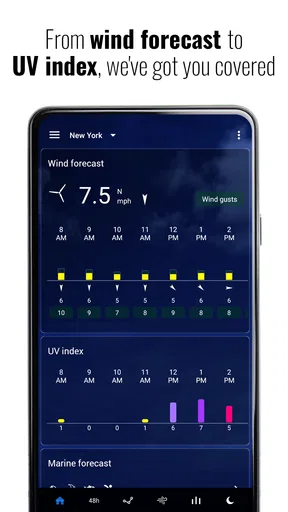
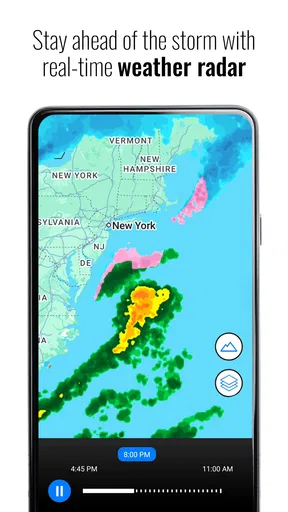
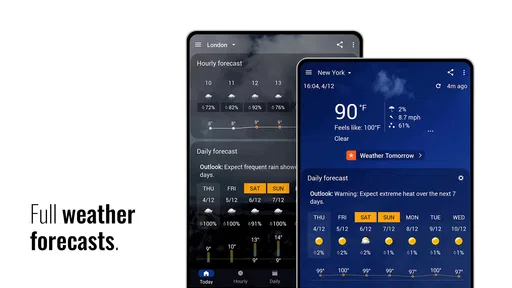
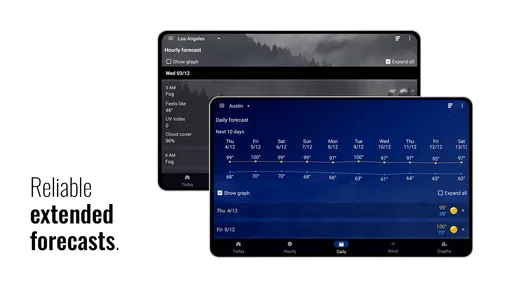
What really sets this app apart is the plethora of features it offers. Not only does it provide accurate weather forecasts, but it also includes hourly updates, a 7-day forecast, and even alerts for severe weather conditions. The clock is customizable, letting you choose from different clock styles, which adds a personal touch to your device. Plus, the app supports multiple languages, making it accessible for users around the world.
One feature I found particularly useful is the sunrise and sunset times. It’s one of those things you didn’t know you needed until you have it. Planning your day around these times has never been easier, and it’s a great feature for photography enthusiasts or anyone who loves a good sunset view.
Make the settings work for your habits
I’d spend a little time setting up the display before judging whether the app belongs on my home screen. The useful question is not “Which layout has the most information?” but “Which details help me make a decision without squinting?” If I mostly check the time and current conditions, a restrained widget is likely better than one crowded with extra readings. If I plan outdoor activities, a more informative layout may earn its space.
There is a trade-off between personalization and clarity. Clock styles and visual adjustments let the display fit a device, but every extra element competes for attention. I’d make one change at a time, then use the widget for a day rather than endlessly tuning it in the setup screen. That makes it easier to notice whether a color, font, or arrangement genuinely helps in daylight and at a quick glance, instead of merely looking attractive in a preview.
For forecasts, I find it helpful to distinguish a quick check from a planning check. A current reading is useful for deciding what to wear right now; an hourly view is more relevant when I’m timing a walk or commute; and a longer forecast helps with broad plans, not certainty about a particular moment. Treating each view as a different tool avoids overreacting to one number and makes the app’s range more useful.
Performance and Usability
Performance-wise, the app runs smoothly on both Android and iOS devices. I didn’t experience any lag or crashes, which is always a plus. The weather updates are precise and timely, ensuring you’re never caught off guard by a sudden downpour or unexpected heatwave.
The customization options are also worth mentioning. You can tweak almost every aspect of the widget to suit your style, from colors to fonts, ensuring it matches your aesthetic perfectly. It’s these little touches that make using the app a pleasant experience every time you check your phone.
Faster patterns for ordinary days
A repeatable routine is where a combined clock-and-weather app can save small amounts of friction. In the morning, I can check the home screen before getting dressed, then use the hourly forecast if rain would change my route or departure time. Before leaving later, I can glance again rather than reopening several tools. This is especially handy on days when conditions are changeable, because the display makes checking feel like part of looking at the time.
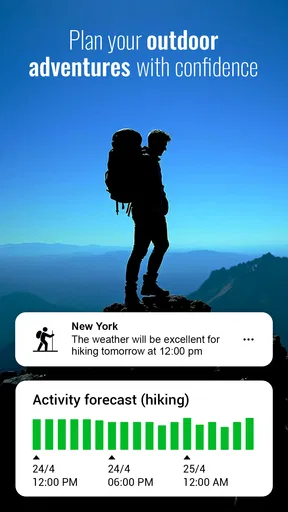
For a realistic example, imagine I’m taking a camera out after work. I’d check the day’s broad outlook when making the plan, then look at the hourly forecast closer to departure and use sunrise or sunset timing to decide whether the light will suit the outing. The app won’t make the creative decision for me, but it puts those checks in one place and reduces the chance that I forget the daylight window while focusing only on temperature.
There is a useful habit for severe-weather alerts, too: I would treat an alert as a reason to check the situation, not as a substitute for judgment. If I’m heading somewhere unfamiliar or making a safety-sensitive plan, I’d verify conditions before setting out and keep an eye on changes. A phone display is convenient, but convenience should not turn a forecast into a guarantee.
How it compares with simpler weather options
Compared with a basic clock widget, this app’s advantage is that weather context sits beside the time, so I don’t have to open another app for a quick check. Compared with a weather app that focuses mainly on a full-screen forecast, its appeal is the persistent, customizable home-screen presence. That is a real difference in workflow, not proof that one forecast is automatically more accurate than another.
If I only need a temperature once in a while, the weather view already built into my phone may be enough and require less setup. If I want detailed specialist forecasting for a particular activity, I’d compare dedicated services rather than assume a general-purpose clock-and-weather app is the best tool. Transparent clock and weather is strongest when I value a glanceable display, personal styling, and a convenient route from a quick check to a broader forecast.
Advanced limits worth knowing
The main friction is that the app’s usefulness depends on how well its display fits the way I use my phone. A widget occupies home-screen space, and transparency does not automatically make it unobtrusive or readable. Someone who prefers a very bare home screen may see the combined panel as clutter, while someone who enjoys tailoring a layout may find the adjustment worthwhile. I’d test it on the screen I actually use most, not on a secondary page that I rarely visit.
Forecast language can also encourage false confidence. A seven-day outlook is handy for spotting a general pattern, but I wouldn’t plan a precise outdoor schedule around a distant forecast. I’d use the longer view to decide whether a plan seems sensible, then revisit the nearer-term information as the day approaches. That distinction matters more than adding another widget detail: it helps keep a convenient forecast in its proper role.
Because the app is free to start and includes optional purchases, I’d first see whether the basic setup answers my everyday questions. The purchase range is worth keeping in mind, but it does not make upgrading necessary for everyone. If the free experience already gives me a readable clock, a useful weather glance, and the forecast views I actually consult, there is no reason to pay simply because extra options exist.
It is also worth being realistic about what “all in one place” means. Combining time and weather streamlines routine checks, but it does not remove the need to open the app when I want more detail or to confirm a plan. I would choose it for convenience and customization, not because a single home-screen view can replace every weather source or every careful decision.
Who will get the most from it?
I’d recommend it to someone who checks the weather several times a day, likes having the clock visible, and is willing to spend a few minutes finding a display that stays readable. It is particularly suited to people who plan walks, commutes, casual photography, or other flexible outdoor activities and want quick access to current conditions, an hourly view, and a broader outlook.
I’d be less likely to recommend it to someone who wants a completely minimal home screen, rarely checks weather, or depends on highly specialized forecasts for work or safety. In those cases, the built-in weather option may be simpler, or a dedicated service may be a better fit. The app’s value is not that it must replace every alternative; it is that it can make ordinary time-and-weather checks easier when those checks are already part of your day.
Is It Worth It?
So, is Transparent clock and weather worth the download? In my opinion, absolutely. It combines functionality with aesthetics in a way that few apps manage to do. Whether you’re a weather enthusiast or someone who just likes to keep things organized, this app ticks all the right boxes.
In a world where we rely so heavily on our devices for information, having an app that consolidates time and weather in such a seamless way is a game-changer. The added bonuses of customization and reliability make it a must-have for any smartphone user.
To wrap it up, if you’re looking for an app that’s both practical and pleasing to the eye, give Transparent clock and weather a go. It’s more than just a clock and weather app; it’s a little slice of convenience that fits right in your pocket.
Privacy and Permissions
See what permissions an app requests and how it handles your data.
- Calendar
- read calendar events plus confidential information
- Location
- approximate location (network-based), precise location (GPS and network-based)
- Photos/Media/Files
- read the contents of your USB storage, modify or delete the contents of your USB storage
- Storage
- read the contents of your USB storage, modify or delete the contents of your USB storage
- Camera
- take pictures and videos
- Other
- view network connections, full network access, run at startup, set wallpaper, control vibration, prevent device from sleeping, Google Play license check
Verdict
Strengths of Transparent clock and weather
- Accurate weather updates for multiple locations.
- Customizable widgets with sleek design.
- Hourly and daily forecast details.
- Seamless integration with calendar events.
- Supports multiple languages for global users.
Limitations of Transparent clock and weather
- Ads can be intrusive in the free version.
- Some features require in-app purchases.
- Occasional lag when updating widgets.
- Limited customization for widget sizes.
- Requires constant internet connection.
Other Releases by MACHAPP Software Ltd
View All
Sense Flip Clock & Weather
Weather4.2

Sense V2 Flip Clock & Weather
Weather4.2

Transparent clock weather Pro
Weather4.1

Sense flip clock & weather Pro
Weather4.3
Similar Picks in This Category
View All
Weather - By Xiaomi
Xiaomi Inc.4.1

Weather & Radar Forecast
WetterOnline4.8

Weather
OneLouder Apps4.6

AccuWeather: Weather Radar
AccuWeather3.6

The Weather Channel - Radar
The Weather Channel4.6

1Weather Forecasts & Radar
OneLouder Apps4.3
You May Also Like
View All


Frequently Asked Questions
What features does Transparent Clock and Weather offer?
Transparent Clock and Weather provides a comprehensive set of features including a customizable clock widget, real-time weather updates, forecasts for multiple locations, and detailed weather information like humidity, wind speed, and UV index. It also offers various themes and styles to personalize the appearance, ensuring it fits seamlessly with your device's home screen.
Is Transparent Clock and Weather free to use?
Yes, Transparent Clock and Weather is free to download and use, but it does offer in-app purchases. These purchases usually provide additional features, such as removing ads or accessing premium themes. The free version itself is quite robust, providing essential weather and clock functionalities without any cost.
How accurate is the weather information in Transparent Clock and Weather?
The app sources its weather data from reliable and well-known meteorological services, ensuring high accuracy. It updates frequently to provide current conditions and forecasts. However, like any weather app, there can be occasional discrepancies due to rapid changes in weather patterns. Regular updates help maintain its reliability.
Can I customize the widget appearance on my home screen?
Absolutely! Transparent Clock and Weather allows extensive customization options for its widgets. Users can choose from various sizes, styles, and themes. You can also adjust the transparency level to ensure the widget blends well with your wallpaper, providing both aesthetic appeal and functional information at a glance.
Does Transparent Clock and Weather drain battery life significantly?
The app is designed to be efficient and minimize battery usage. It uses smart updates to ensure that data is refreshed without unnecessary battery drain. While any app that updates regularly will use some power, Transparent Clock and Weather is optimized to run smoothly without significantly impacting your device's battery life.
